
Looking for hidden AI tools that actually boost productivity? In this guide, we uncover underrated AI productivity tools for email, scheduling, writing, meetings, and content creation that most people overlook.
Are you tired of the same old productivity apps? Sure, Notion, Trello, and ChatGPT are great, but what about the AI tools no one is talking about yet? Hidden gems that can skyrocket your efficiency without the hype?
Well, you’re in luck! Here are some underrated AI-powered productivity tools that deserve your attention. Get ready to save time, work smarter, and maybe even have a little fun along the way!
1. Ellie – AI Email Assistant for Faster Replies #
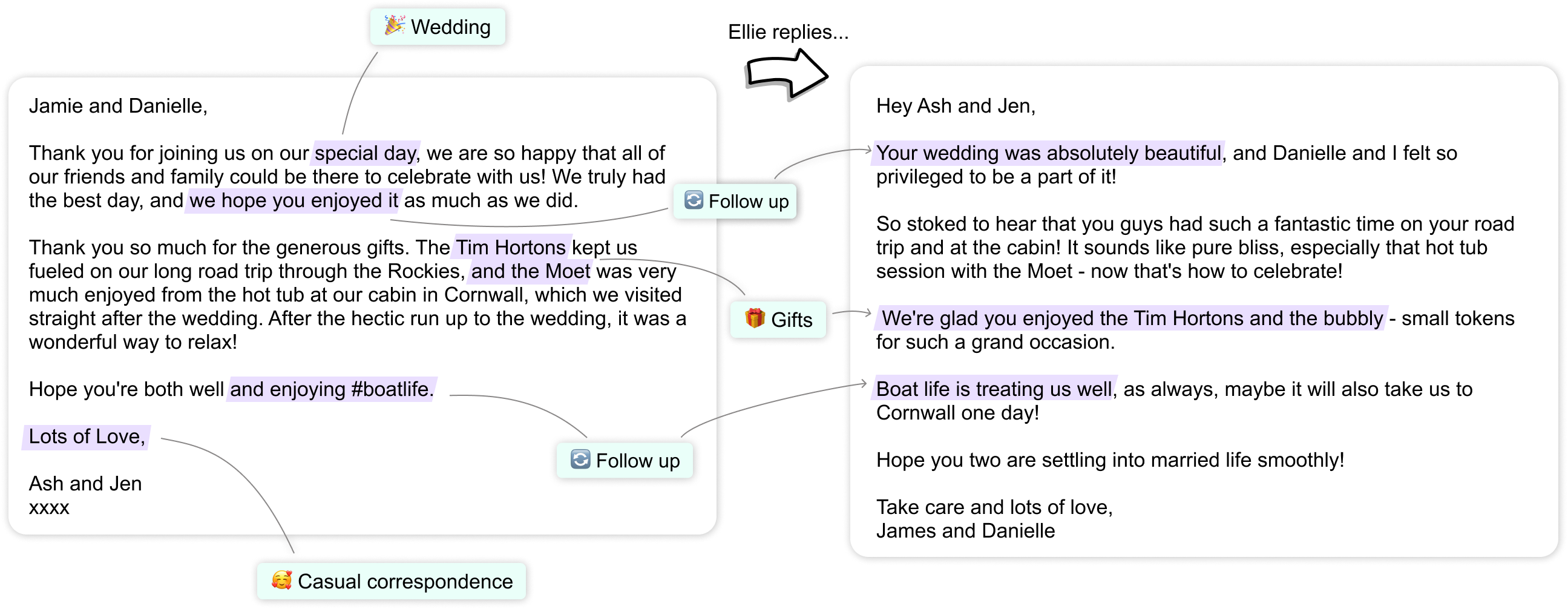
If you find yourself drowning in emails, Ellie is here to help! This AI-powered Chrome extension reads and understands some of your example emails data, learns from your writing style and creates replies to emails. No more typing the same replies over and over!
Why you’ll love it:
-
Writes email replies like a human
-
Saves HOURS of inbox stress
-
Adapts to your tone and style
Ellie works best as part of a browser-based productivity system, especially when combined with other Chrome extensions for students that boost focus and organization.
Disclaimer: Some of the links in this post are affiliate links. If you make a purchase through these links, I may earn a small commission at no extra cost to you. Your support helps me continue to create content and share valuable resources with you!
2. Rewind AI – Never Take Notes Again #
Ever forget something important from a meeting? Rewind AI records everything on your screen and makes it searchable like Google for your life. Just type what you remember, and it pulls up the exact moment you need!
Why it’s a game changer:
-
Instant access to past conversations & meetings
-
Saves you from endless note-taking
-
Works offline too!

When you’ve been working nonstop, pairing AI tools with short mental breaks - like exploring fun websites to visit when you’re bored can actually improve focus.
3. Otter.ai – Transcribe Like a Pro #
Perfect for students, professionals, and content creators, Otter.ai automatically transcribes meetings, lectures, and interviews with high accuracy. It even identifies different speakers!
Why it’s a must-have:
-
Turns speech into text in real time
-
Syncs with Zoom & Google Meet
-
Saves you hours of manual transcription work

A focused workspace pairs perfectly with AI tools. Here are some productivity keyboards that make long work sessions more comfortable:
4. QuillBot – Your AI Writing Sidekick #
Writing reports, emails, or blog posts? QuillBot can rewrite sentences, improve clarity, and even summarize articles. It’s like Grammarly but with extra magic.
Why you need it:
-
Fixes awkward sentences
-
Helps you write faster
-
Great for students & professionals alike
-
Can check plagiarism
5. Fireflies.ai – AI That Takes Meeting Notes for You #
Say goodbye to manually jotting down notes in meetings! Fireflies.ai automatically records, transcribes, and even summarizes your calls so you can focus on the conversation instead.
Best features:
-
Works with Zoom, Microsoft Teams, and Google Meet
-
Searchable meeting notes
-
AI-powered action items

6. Motion – AI-Powered Scheduling #
Overwhelmed by your to-do list? Motion automatically prioritizes and schedules your tasks based on deadlines, making sure you stay on top of everything without stress.
Why it’s awesome:
-
AI plans your day for you
-
No more manually organizing your calendar
-
Helps prevent procrastination

7. Copy.ai – AI for Content Creation #
Need help writing blog posts, ads, or product descriptions? Copy.ai generates high-quality content in seconds. It’s a lifesaver for marketers, bloggers, and entrepreneurs.
What makes it great?
-
Saves time on content writing
-
Helps with writer’s block
-
Generates social media captions instantly
8. Superhuman – AI-Powered Email for Speed Demons #
Superhuman turns email into an ultra-fast experience with AI-powered shortcuts, smart filtering, and instant responses. It’s perfect for inbox zero enthusiasts!
Why it’s a must-try:
-
Makes email ridiculously fast
-
Helps you clear your inbox in minutes
-
AI-powered email reminders & scheduling

9. Krisp.ai – Noise Canceling AI for Remote Work #
If background noise is ruining your calls, Krisp.ai is a must-have. It removes unwanted noise in real-time so you sound crystal clear during meetings.
Why it’s amazing:
-
Eliminates background noise (dogs, kids, traffic)
-
Works with Zoom, Skype, and all major apps
-
Perfect for remote workers
10. Lumen5 – AI Video Creator #
Want to turn blog posts into videos effortlessly? Lumen5 uses AI to transform text into engaging videos in minutes, perfect for social media marketing.
Why it’s a hidden gem:
-
Converts text to video automatically
-
No video editing skills required
-
Great for content creators & businesses

These hidden AI gems can help you automate tasks, improve efficiency, and free up more time for what truly matters.
Which AI tool are you most excited to try? Let me know in the comments!
Productivity isn’t just about tools - sometimes your brain needs a reset. If you enjoy playful digital breaks, you might also love these interactive websites that are surprisingly fun and engaging.
And if you found this list helpful, don’t forget to share it with someone who could use a productivity boost! 🚀
Frequently Asked Questions #
Are AI productivity tools worth it? #
Yes, AI tools can automate repetitive tasks, improve focus, and save hours every week when used correctly.
Are these AI tools free? #
Most tools offer free plans or trials, with paid options for advanced features.
Which AI tool is best for students? #
Otter.ai, QuillBot, and Motion are especially useful for students.